Budget Paperwork
Submit Paperwork to FinanceEconomic Development Director
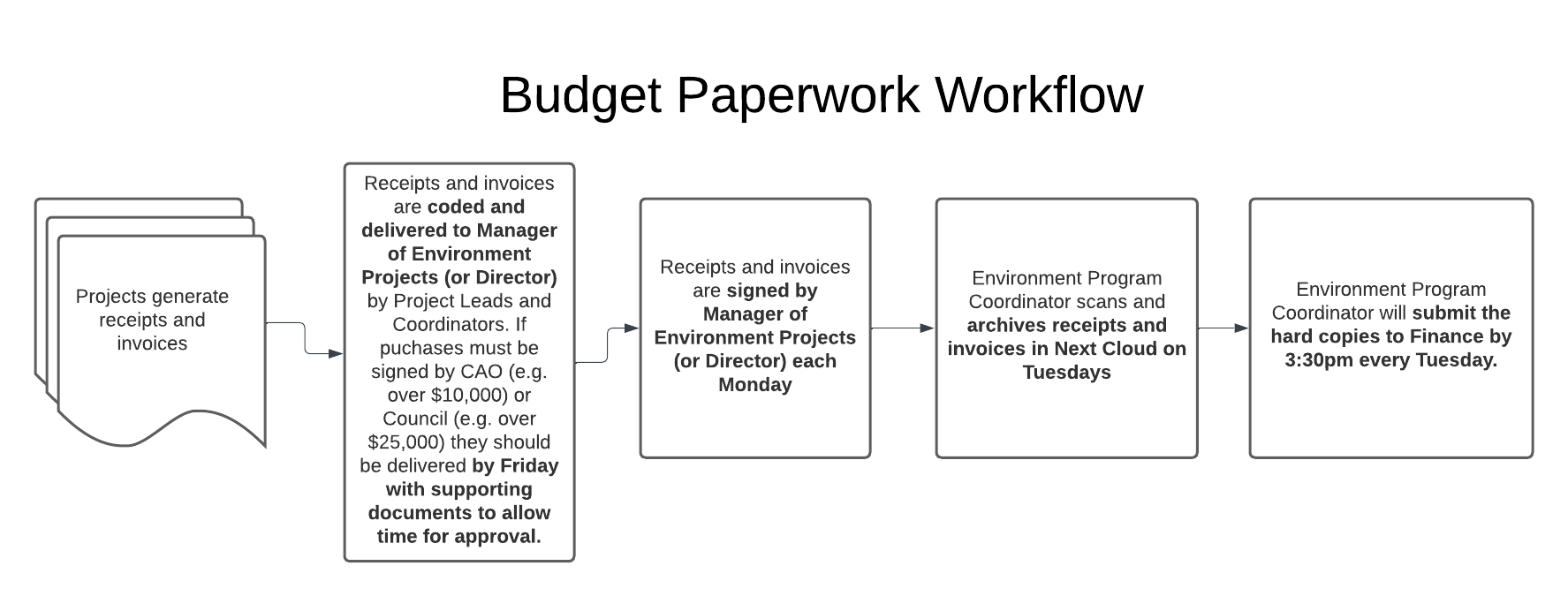
Original itemized receipts/invoices and credit/debit slips (if applicable) must be submitted to Financethe inEconomic personDevelopment whenDirector claiming expenses and reimbursements. Ensure all invoices and receipts are appropriately coded and signed before submitting to the Environment Director or Manager of Environment Projects for signing. If an invoice is returned by Finance because it is not appropriately coded/signed, the invoice must be submitted again with the required information.
Please submit each invoice only once. There is a risk it may get entered more than once and paid more than once if it is submitted more than once.
Paperwork will be delivered to the FinanceEconomic departmentDevelopment once per week (Tuesday)Director by theplacing Environmentit Program Coordinator. Once receipts are signed byin the Managerorange "Ec Dev Needs Signing" folder in the "finance to admin/ ec dev" box outside of Environmentthe ProjectsFinance and/oroffice.
Economic Development Director ofSigns Environment,Paperwork
The EnvironmentEconomic ProgramDevelopment CoordinatorDirector has the responsibility to scan receipts/invoices and save records in Next Cloud. Once records are digitized,signs the paperwork isand stampedplaces asthe 'Delivered'documents in the yellow "Ec Dev Signed" folder in the "finance to admin/ ec dev" box outside of the Finance office.
Scan Document and Submit Signed Paperwork to Finance
On Mondays, the 'Date'Economic Development Program Lead scans signed documents from the yellow "Ec Dev Signed" folder in the "finance to admin/ ec dev" box outside of the Finance office and ismoves deliveredthe documents to Finance.the "admin/ec dev to finance" box outside of the finance office.
The Next CloudSharepoint Archive
CopiesScanned copies of paperwork such as cheque requisitions and invoices must be saved in NextSharepoint. Cloud. This ensures that the Environment Department has a complete record of invoices and reimbursements for project tracking. See Budget Tracking for more details about how to link paperwork to budget spreadsheets.
Save Receipts on Next Cloud
Ensure that approved and coded receipts (e.g., Cheque Requisitions and VISA Authorizations) are scanned carefully so that all information is legible. Save files in pdf with the file name: YYYY-MM-DD_project_Supplier_description_receipt.
YYYY-MM-DD is the date of the Cheque Requisition. If the Cheque Requisition is associated to multiple projects, include all projects in the filename (e.g. 2021-02-22_QVI_CDCR_SSI_CanadianTire_boathooks_receipt). Supplier is the name of the company or organization where purchase was made. Description is a short description of what was purchased.
Scanned files are archived in Next Cloud and are saved in the following location:
Budgeting Tools > Invoices_and_receipts > YYYY-YYYY_fiscal > Project_profitcentrecode >
If the Cheque Requisition is associated to multiple projects, save it to all project folders that apply.
Save Invoices on Next Cloud
Invoices should be signed and stamped with a PC code, GL code and date. This is done in pdf by adding text/using a stamp and submitting to the Environment Director for signature.
Example:
PC: 905 (Profit Centre)GL: 57600 (General Ledger approved expense category)Date: Feb 14 0222
Save signed and coded invoice files in pdf in Next Cloud with the file name: YYYY-MM-DD_project_Supplier_description_invoice.
YYYY-MM-DD is the date of the invoice. If there is no date on the invoice, used the scanned date. If the invoice must be associated to multiple projects, include all projects in the filename (e.g. 2021-02-22_QVI_CDCR_SSI_MillBayMarina_boatgas_invoice). Supplier is the name of the company or organization where purchase was made. Description is a short description of what was purchased.
Invoice files are archived in Next Cloud. Ensure that you save the invoice in the appropriate folder in Next Cloud so that the invoice is associated to the correct funding and contribution agreement. Folders are set up per contribution agreement or funding agreement. Receipts should be saved in Next cloud in the following location:
Budgeting Tools > Invoices_and_receipts > YYYY-YYYY_fiscal > Project_profitcentrecode
If the Invoice is associated to multiple projects, save to all project folders that apply.
Save Travel Expense Claims on Next Cloud
Ensure that approved and coded Cheque Requisitions are scanned carefully so that all information is legible. Save files in pdf with the file name: YYYY-MM-DD_project_Name_description_travel.
YYYY-MM-DD is the date of the Travel Expense Claim. If the Travel Expense Claim is associated to multiple projects, include all projects in the filename (e.g. 2021-02-22_QVI_CDCR_SSI_JohnDoe_triptoVictoria_travel). Name is the name of the traveler. Description is a short description of what was purchased.
Scanned files are archived in Next Cloud and are saved in the following location:
Budgeting Tools > Invoices_and_receipts > YYYY-YYYY_fiscal > Project_profitcentrecode >
If the Cheque Requisition is associated to multiple projects, save it to all project folders that apply.
Roles and Responsibilities